This page was generated from the source of RoboHub. Edit the source, not this page.
RoboHub Mesh
Mesh plans and runs the device side of an installation: a gateway, the boards that
report through it, the sensor modules on those boards, the network devices beside
them, the links between them and the firmware each board runs. It draws every mesh
as a tree, writes each board's firmware from the plan, programs it, starts the
gateway, and keeps the readings that come back in the telemetry store the other
applications read. It is the part of RoboHub that knows about boards, not only
about modules.
Reaching it
| Through the keeper | http://127.0.0.1:19090/app/mesh/mesh |
| Its own loopback port | http://127.0.0.1:8478/mesh |
| Unit | mesh (systemd user unit the keeper writes) |
Mesh is a keeper-hosted application: the keeper installs it, runs it and serves it
under its own origin (keeper/index). Its front door is /mesh, the fleet of
every mesh; a mesh opens at /mesh/p/<project>.
# ${ROBOHUB_WORKSPACE} holds robohub, robohub-drivers, robohub-devices and this repository.
rho build .
./build/mesh                 # by hand; normally the keeper starts it
Signing in
Mesh trusts the sessions and tickets the keeper issues. Started by the keeper, it
fetches the keeper's public key from the keeper on its machine; started elsewhere,
it is told where the keeper is with RHO_AUTH_URL, sends a person there to sign in,
and fetches the key from <RHO_AUTH_URL>/auth/public-key, keeping a copy so a
keeper that is briefly down locks nobody out.
Without a keeper, RHO_AUTH_STANDALONE=1 ./build/mesh runs Mesh on its own: it
answers requests from its own machine as the local user and refuses any from
another machine or through a proxy.
Who may do what
Mesh reads the grants the keeper put in a person's ticket (given under Users &
access in the keeper):
| Grant | May |
|---|---|
*, mesh:* | everything |
mesh:read | read every mesh |
mesh:<mesh> | read and change that mesh |
mesh:<mesh>:read | read that mesh |
A new mesh, copying one, applying in every mesh and Mesh's own settings need
mesh:*. Someone granted particular meshes sees a fleet of those only.
Pages
The top bar has Fleet, Faults, Settings and Documentation; the bar
at the bottom lists every mesh, with New mesh beside them. The keeper and the
other applications are in the app switcher.
| Page | Address | What it does |
|---|---|---|
| Fleet | /mesh | Every mesh as a card, new meshes, faults across meshes, search |
| Agora | /mesh/p/<project> | One mesh as a live tree, edited in the inspector |
| Apply changes | /mesh/p/<project>/apply | What differs from what runs, and the jobs that apply it |
| Mesh settings | /mesh/project/<project>/settings | Name, description, gateway URL, retention, copy, delete |
| Faults | /faults | The fault inbox, cleared one by one |
| Settings | /settings | Mesh's own settings |
| Documentation | /mesh/docs | This guide, embedded in the program |
The fleet
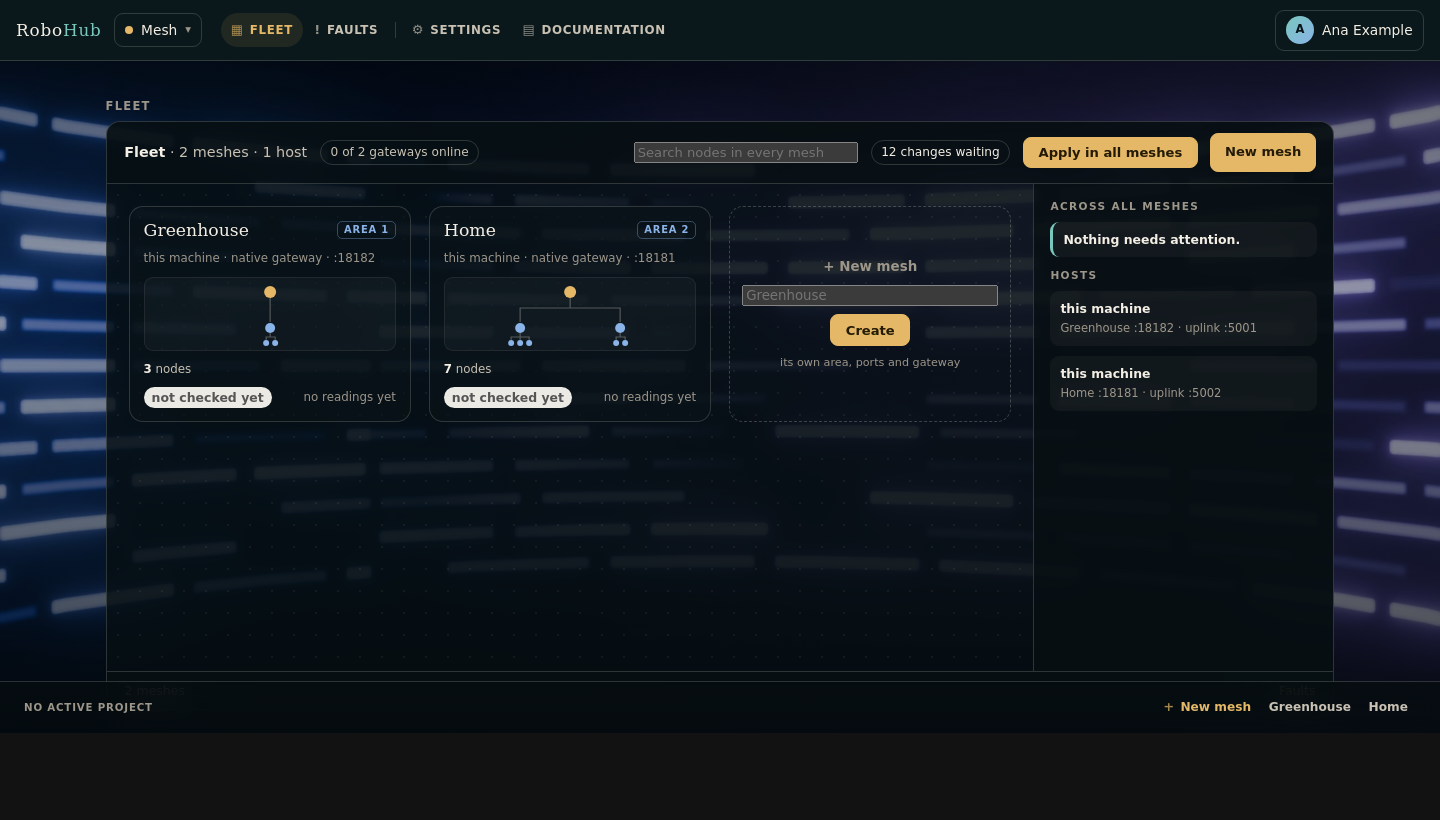
/mesh shows every mesh this Mesh manages as one panel:
- a card per mesh with its tree drawn small — the gateway, the boards and
devices under it, their modules — its counts and readings, and whether its
gateway answers; - + New mesh, which takes a name and gives the mesh its own folder, area,
REST port and uplink port, so two meshes run side by side on one machine; - the inbox of faults across every mesh, and the hosts their gateways run on;
- an activity strip with how many meshes are down and how many faults are open;
- a search that finds a node by its name, id, board, module or device in every
mesh, and opens it.
Renaming a mesh changes its display name, not its folder. Deleting it stops its
native gateway, removes the folder and frees its place in the fleet.
The agora
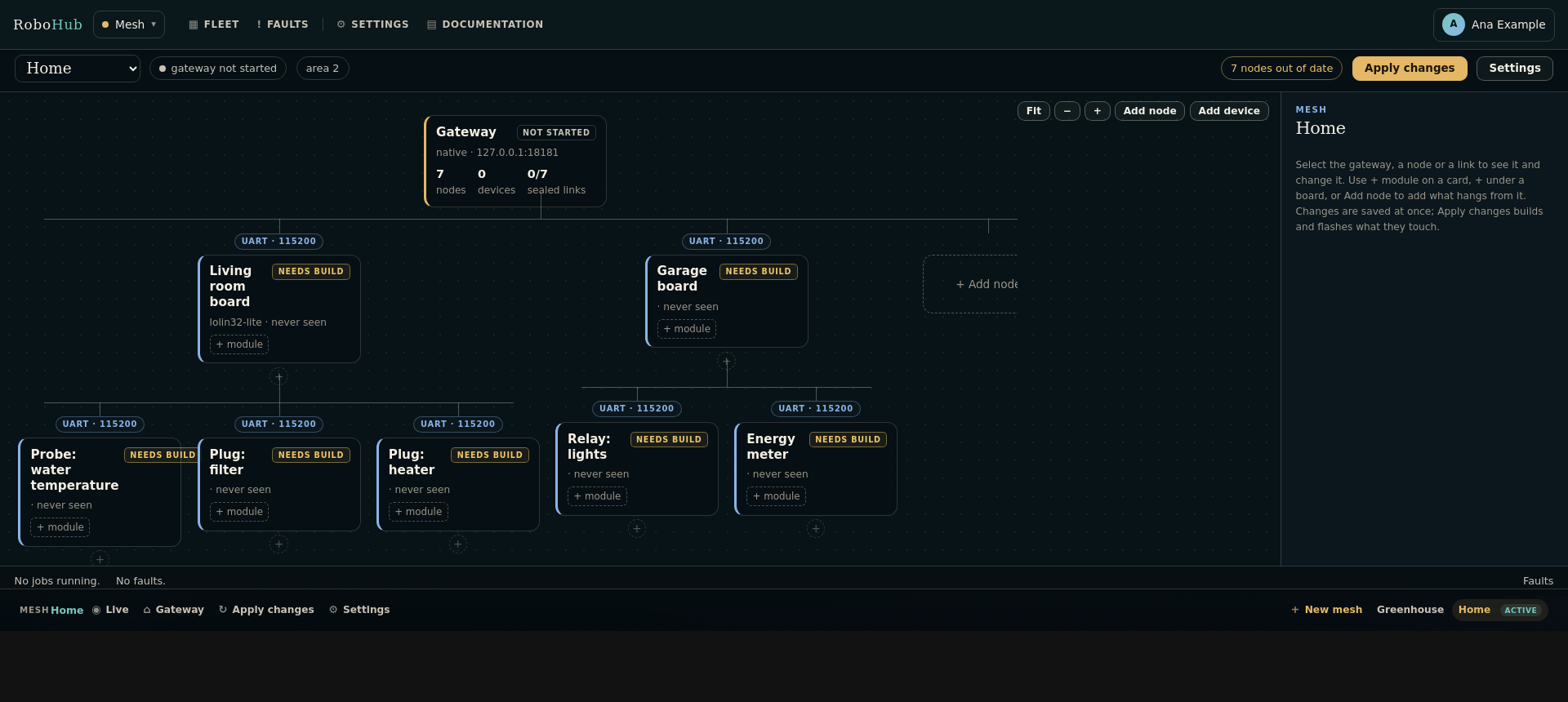
A mesh opens as its agora: the live tree, a bar above it, an inspector beside it
and an activity strip below.
- The gateway is the root, every board branches from its parent, and the badge on
a branch is the link and names its transport. Modules hang under the board that
carries them; devices under the gateway or board that owns them. - Each card says what the mesh reports about it: online with its last reading,
quiet, or no readings — and, for a board, whether it runs what is planned. - The bar says whether the gateway answers and offers Apply changes when a
board or the gateway differs from what it runs.
Selecting the gateway, a card or a link badge opens it in the inspector. The project
and the selection are in the address — /mesh/p/<project>?select=node:<id> — so two
tabs show two meshes and a link opens the node it names. The wizard's old addresses
(/mesh/plan, /mesh/step/..., /mesh/node/<n>) open the agora with what they
showed selected.
A new mesh opens on the same canvas with three prompts: choose where the gateway
runs, add the first node, apply. On a narrow screen the inspector is a sheet at the
bottom of the page.
Editing in place
Every edit is made in the inspector and saved at once:
- Node — a board's name, description, role (
node,relayorgateway), board
and parent. Moving a board under another keeps its link when the new parent can
serve it and picks one both can otherwise. - Link — the transport and its settings, for the link the board reaches its
parent over. - Modules — the modules fitted to the board, with its bus plan.
- Data — what the board or device last reported; a device can be polled and
switched here. - Delete — says what goes with the node (its modules) and asks where what hangs
from it moves. No other node changes its number or its id. - + node, + module and + device under any card add what hangs from it.
- The gateway's own inspector sets where it runs and its ports, and builds, starts
and stops it.
An edit builds nothing and resets nothing. What a board's image is built from — its
board, role, parent, link and the link's settings, its modules, the links it serves,
and the gateway's address when it dials it — is its signature, recorded when the
board is programmed. A board whose plan differs shows as out of date, with what
changed: a new name changes nothing, a new module puts that board alone out of date,
a new link puts the board out of date and asks the gateway or relay serving it to
restart.
Each save raises the node's own revision. A form opened before the node's last save
is refused — "changed elsewhere" — rather than written over it.
Nodes and modules
A node is one computer. A sensor module is a node of its own — kind: module —
attached to a node, and a node can carry any number of them. A module node is never
built or programmed separately; the image of the node it extends carries it.
Modules are read from robohub-drivers/boards on every load of the editor, so a
board added to that checkout appears without rebuilding Mesh. Output and transceiver
boards are left out. The first module attached to a node names the example its
image is built from. A native host has no pins: on a native gateway the module
controls are absent.
Each module says how it reaches a bus in its own manifest:
board:
  bus:
    type: i2c
    instance: i2c0
    address: "0x77"        # a part with one address
    addresses: "0x76-0x77" # or the range it can be configured in
    cs: auto               # SPI: the node picks a chip select
The Modules tab shows a bus plan, which is how several modules become one node:
- 1-Wire modules share
onewire0. - I2C modules share
i2c0; two fixed addresses on the same bus conflict, and a
module with an address range is assigned one that is free. - SPI modules share the bus lines and each gets a distinct chip select.
- ADC, PWM, GPIO and UART instances are exclusive.
A conflict is shown on the node and that module is left out of the image, so the
parent still builds. A module that says nothing about its bus is listed without a
plan rather than guessed at.
Device nodes
A network device is a node of its own too: an integration from robohub-devices
(the Shelly Plug M Gen3, a Hoymiles through an OpenDTU, …) attached to a gateway or a
relay. It is never built or programmed. The device editor chooses the integration,
the transport (http or mqtt), an HTTP address and the device id. An HTTP device
is polled by Mesh's background worker and can be polled and switched from the Data
tab; an MQTT device reaches Mesh through the broker the keeper runs. Switch actions
appear only for a plug, switch or actuator.
Links
A link offers only transports both boards can serve: the transports the
robohub-transport module declares (capabilities.transports) that are also in each
board's capabilities.links. Today they are UART, USB, Console, WiFi, Socket,
Ethernet, RS-485, SPI and I2C. Console is offered only when the parent is a host,
because the console is the host's byte stream.
| Transport | Fields |
|---|---|
| UART / USB / Console / RS-485 | parent endpoint, node endpoint, baud (RS-485 also its address) |
| WiFi | SSID, password, parent host, node host, TCP port |
| Ethernet / Socket | parent interface or host, node address, port |
| SPI / I2C | parent bus, node bus, address |
Apply changes and jobs
Apply changes lists what differs from what runs and what applying will do:
build each changed board and then flash it, and restart the gateway (or build and
program it, when it is a board). A board's inspector can build and flash that board
alone, and the gateway's can rebuild and restart it.
Applying queues jobs and answers at once. Each job is a script beside the project
with its own log; one runner per mesh works through them in order, so a long build in
one mesh never waits on another, and no page waits on a build. A job that depended on
one that failed is skipped. A job opens its log in the inspector, where a failed one
can be tried again.
A node is built from the modules in the plan: Mesh copies the telemetry node
template, writes src/sensors.c from the descriptors in robohub-drivers, adds every
compatible module and its driver, writes the Kconfig the board and modules need, and
builds with the commands the examples use:
rho build -target <board> <project>/boards/node_<number>
rho flash -target <board> -project <project>/boards/node_<number> <image>| Transport | Node link in the firmware |
|---|---|
| UART | a hardware UART (uart1 on the Pico 2 W) |
| USB / Console | USB CDC |
| WiFi / Socket | the TCP sink |
A flash waits on its board's card, with that board's instruction, until you say the
board is in its programming mode — for a Pico 2 W, BOOTSEL: hold BOOT, tap RST,
release RST, then BOOT. Under WSL the flash shares the board with WSL (Windows asks an
administrator once) and attaches it, re-attaches it after the reboot into BOOTSEL,
and falls back to the bootrom's drive. When a flash succeeds the board runs what is
planned and stops showing as out of date.
Production builds
A production build hardens a board in ways that cannot be undone: an ESP32 burns
eFuses for secure boot v2 and flash encryption, an RP2350 writes its boot key's hash
into OTP and then boots only images signed with that key. It is off for every
board until someone turns it on, on that board, in its inspector's Access tab
(the plan says node.<n>.production: on). The toggle is shown only for a board
whose platform declares a production plan — the file rho flash --production
reads, looked up the same way under <platform>/production/ (the target's name,
its preset, its family, then production.json). An ESP32, an RP2350 and an STM32
(RDP level 1, reversible) have one; an RP2040, an AVR board and a Linux host have
none, and turning it on for them is refused. Turning it on shows the warning: the
steps are irreversible, and a board flashed this way cannot go back to a plain
image.
When it is on:
- the board's
project.confcarriesCONFIG_RH_PRODUCTION=y, and the board is out
of date (production build changed) until it is built again; - if the platform's plan names
RH_SECURE_BOOT_SIGNING_KEY(ESP32: an RSA-3072 PEM
key; RP2350: a secp256k1 PEM key), the build needs the mesh's secure-boot
signing key: an absolute path on the machine running Mesh, set in the same tab,
kept insigning-key.txtbeside the plan (0600) and never in the plan. Mesh
never reads the key; the build job is given its path as
RH_SECURE_BOOT_SIGNING_KEY. A production build is not queued while no key
is named, the file is not there, or the group or others can read it; - the build job ends with
rho flash ... --production --dry-run, written to
production-plan.txtin the board's folder; - the flash job waits with that printout — every step, irreversible ones marked —
as its waiting for you text, and a field for the board's name. Only the exact
name lets it run: Mesh writes what was typed beside the job, and the job hands
it torho flash -target <board> -project <dir> <image> --productionon its
standard input, where rho flash checks it again. On an RP2350 the job sets
RH_PICO_OTP_JSONto the build'sbuild/output/<program>.otp.json. There is no
way past the typing.
Turning the toggle off makes the next build a plain image again — on an ESP32 or
RP2350 that was already flashed for production, that image will not boot: keep the
key, and build for production.
Linked meshes
A mesh can report through another: in its gateway's inspector, Reports through
names the mesh whose gateway carries it. Its gateway then runs as a relay
(robohub-gateway's relay mode): it dials the parent gateway's uplink as a board of
the parent's mesh, with an id of its own (relay_uid in its plan) and the key the
parent derives for that id from its own gateway key, written beside the child as
relay.key. The parent listens on its uplink while a mesh reports through it.
Linking or unlinking changes both gateways' signatures, so both show that a restart
applies it.
The parent's agora shows each linked mesh as a node under its gateway that opens to
its own tree; the fleet says which mesh reports through which. A mesh cannot report
through itself or through a mesh that reports through it.
Across meshes
- Move to another mesh, on a board's or device's Node tab, moves it with its id,
its modules and its history; what hangs from it stays, under its parent. It is out
of date until it is built with the other mesh's key. - Copy as a template, on a mesh's settings page, starts a new mesh with the plan —
gateway, boards, modules, links — and its own area and ports, and nothing of what
was deployed. - Apply in all meshes, on the fleet's bar while changes are waiting, queues each
mesh's jobs at once.
Settings
Mesh's settings (/settings, tabs):
| Tab | What it holds |
|---|---|
| General | Vertical or horizontal tabs. |
| Alerts | The robohub.alert channels Mesh binds: the log file and threshold; e-mail on/off, recipient, threshold; Telegram on/off, chat, bot token, threshold. |
| Auth | Read-only: the issuer (the keeper), the mode, the sign-in address. |
| Gateway | Read-only: the gateway provider, route, port and the open mesh. |
| Storage | Telemetry retention: raw readings (14 days), minute roll-ups (90), hourly roll-ups (1825), faults (365); WAL checkpoint (5 minutes); retention pass (6 hours); vacuum mode; maximum gateway backoff (60 seconds). |
| Logging | Level, text or JSON, rotating file, size, retention, standard error. |
| Configuration | Read-only: the registry Mesh reads, its plugins, its alert channels. |
A mesh's settings (/mesh/project/<project>/settings): its name, a short
description, the gateway URL it owns, how long its raw readings are kept, Copy as a
template and Delete project. The Storage tab's raw window, when set, applies to
every mesh.
A few keys are written in the mesh's plan.yml by hand, while Mesh is stopped:
| Key | What it does |
|---|---|
gateway_tls_cert, gateway_tls_key | Paths on the gateway's machine; a gateway deployed over SSH or ADB then serves HTTPS, and gateway_url is an https:// address. |
gateway_audience | The gateway is another service that produces readings (energy, for one): Mesh polls it with a token for that audience and the <audience>:gateway scope. |
How it connects to the rest
| What | How |
|---|---|
| The keeper | Signs people in; installs and runs Mesh; registers it as a client for the services it calls (deploy.calls: [gateway, energy]). |
| Gateways | Each mesh's gateway (robohub-gateway/index), started, deployed or programmed by Mesh. |
robohub.bus | Bound to robohub-provider-mqtt: Mesh is a user of the keeper's MQTT broker, publishing +/rpc and mesh/+/telemetry, subscribed to +/status/# and +/online. |
robohub.alert | Bound to the log, e-mail and Telegram providers. |
| Shared modules | ui, i18n, settings, forms, notifications, htmx, logging. |
| Applications | The aquarium and energy read a mesh through robohub-provider-mesh/index, which implements the gateway contract against Mesh's API. |
| Boards and drivers | Read at run time from the local registry's platform modules and robohub-drivers / robohub-devices: nothing in the planner names a board or a driver a manifest does not. |
Where the boards and drivers come from
Boards are found by scanning the local registry for platform modules and reading the
manifests under their boards/ directories. A board declares its roles and hardware
in capabilities:
capabilities:
  gateway: true
  relay: true
  node: true
  host: false
  links: "uart console usb wifi socket"
  buses: "uart usb i2c spi onewire gpio adc pwm"
  deploy: "flash"
A driver declares what it measures and how a node carrying it is built:
capabilities:
  sensor: true
  buses: "onewire"
  measures: "temperature"
deployment:
  boards: "pico2w"
  example: "examples/temperature/ds18b20/c/telemetry"
  binary: "build/output/telemetry.elf"
  kconfig: "CONFIG_RH_HAL_ONEWIRE=y CONFIG_RH_BOARD_DS18B20_MODULE=y ..."
A platform board also says how a gateway is deployed to it (deployment.method:
adb, ssh, flash or process, with its architecture, user and path). Adding a
board or a driver therefore needs no rebuild of Mesh; the next page load finds it.
Gateway tokens and keys
A gateway's API (/api/v1/) answers only a caller with a short-lived token the
keeper issued for the audience gateway. Each gateway is started with
GATEWAY_ID set to its project, and Mesh presents it a token scoped to that gateway
alone, gateway:<project>:*, asked for with Mesh's own client credential: a token
taken from the network opens one gateway. The single gateway_token an older project
kept is read once into the project's token records so an old installation keeps
working.
Every frame between a board and its gateway is authenticated (robohub-transport's
secure.h). Mesh makes the keys and keeps them out of every repository:
- each mesh has a gateway key, made the first time it is needed and kept in its
folder (gateway.key), readable by Mesh's user only, and installed with the gateway
asGATEWAY_KEY_FILE; a key file that exists is never replaced; - each planned board has an id (
node.<n>.idin the plan), made once; - a board's key is derived from the two and its key epoch (
node.<n>.epoch, 0
until it is rotated) and written into its build assrc/robohub_secret.h,
with the epoch asRH_DEVICE_KEY_EPOCHand the gateway's key scope
(RH_KEY_SCOPE,HMAC-SHA256(K_gw, "rh-scope1")[0:8], which a rotated key is
stored with so a board moved to another mesh ignores the key it stored for its
old one); no repository tracks it.
A board built that way says hello to its gateway, opens a session, and sends only
sealed frames; its gateway accepts nothing else (on the serial link,
ALLOW_PLAIN_FRAMES=1 lets plain frames through while boards are reflashed).
Mesh's tree is its user's alone: every folder is 0700, and what holds a key or a
password — the generated header, project.conf, the built .elf and .uf2 — is
0600 (builds and jobs run under umask 077). Mesh closes what an older version
left readable when it starts.
The node manifest. Mesh writes nodes.txt beside gateway.key — one line per
board, uid|area|node|role|epoch|revoked|areas — whenever the plan changes and at
every gateway start, and installs it beside the key on the gateway's host. The
gateway admits only the boards it lists, takes a board's readings only for its own
placement, and an announce only from a relay for its own areas (a mesh linked
below is one, for its area and those below it).
Revoke. A board's inspector has an Access tab: Revoke takes the board
out of its mesh without re-keying anything — the plan says node.<n>.revoked, the
manifest is rewritten, a gateway on this machine reads it within seconds and one on
another host is sent it at once — and Admit it again undoes it.
Rotate key. The same tab shows the board's key epoch and offers Rotate key:
the plan's node.<n>.epoch goes up by one, the manifest is rewritten and sent as
for a revocation, and the gateway gives the board its new key under its current
session the next time it hears it (REKEY); no flashing. Once the board has
confirmed it, the old key opens nothing, which is how a key that may have been
copied is retired. The tab says what the gateway reports — rekey.txt beside the
key for a gateway on this machine, GET /api/v1/keys for one on another host:
waiting for the board to confirm, confirmed, or cannot rotate for a board
whose firmware has no store for a key (reflash it). A board is not rotated again
before it confirmed the last rotation: the gateway accepts only the current epoch
and the one before it. A firmware built after a rotation carries the current key,
and a host node fetching its key gets the current epoch's. Whoever recorded the
board's traffic with the old key can unwrap the new one; for a key known to be
stolen, rotate and reflash.
Host nodes. A Linux host that speaks the board protocol enrolls with the keeper
and fetches its board id and key from POST /mesh/api/nodes/key (through the
keeper, Authorization: Node <device>:<credential>): Mesh checks the credential
with the keeper's /api/nodes/verify and answers the board planned at the node's
placement, of its current key epoch ("epoch" in the answer). A revoked board
gets nothing, the key is never logged, and a client may ask ten times a minute. rho bootstrap key is the client.
When a mesh names gateway_tls_cert and gateway_tls_key, Mesh records and calls
its gateway at an https:// address, health checks included.
Applications reading a mesh
An application that reads a mesh declares deploy.calls: [mesh] in its manifest. The
keeper registers it as a client, and it asks the keeper for short-lived tokens scoped
to the one project it reads (mesh:<project>); nothing is copied into the
application. The Application tokens table on a mesh's settings page lists tokens
earlier versions made and can revoke them; Mesh no longer makes them.
Every /mesh/api handler verifies the token's audience and project scope: a service
token must carry mesh:<project>, mesh:* or *; a browser session behind the
keeper is held to the person's grants instead. A revoked token is refused without
asking the keeper: the middleware reads the same revoked.txt that
rho auth revoke --jti writes.
An application registers itself as a client of a project, so Mesh can call it back:
POST /mesh/api/clients/register
Authorization: Bearer <service token>

{"app_name":"robohub-energy","project":"default",
 "instance_id":"energy-8482",
 "callback_url":"http://127.0.0.1:8482/api/energy/mesh/events",
 "topics":"energy.commands,grid.status.*"}
Mesh stores the client, its project, its callback and its last-seen time, and returns
a per-client secret; every callback carries Authorization: Bearer <client secret>.
A client is online while its last heartbeat is less than ninety seconds old. Topics
match exactly or by a trailing .*; publishing routes to the clients whose project
and topics match and to no one else.
API
All under Mesh's sign-in; a program presents a service token as above.
| Method and path | What it does |
|---|---|
GET /mesh/api/projects | the meshes the caller may read |
GET /mesh/api/projects/{project}/gateway | the gateway that project owns |
GET /mesh/api/projects/{project}/nodes | the tree: gateway, boards, modules, devices, each with its id, parent, kind, transport and state |
GET /mesh/api/projects/{project}/sources | the project's signals |
GET /mesh/api/projects/{project}/sources/{source}/value | one signal's reading |
GET/POST /mesh/api/projects/{project}/sources/{source}/action | drive an output |
GET /mesh/api/projects/{project}/telemetry/status | rows, newest time, gateway count |
GET /mesh/api/projects/{project}/telemetry/latest?source= | the newest reading |
GET /mesh/api/projects/{project}/telemetry/series?source=&from=&to=&step= | raw readings, or bucket averages when step is set (ms) |
GET /mesh/api/projects/{project}/telemetry/stream | live readings (Server-Sent Events) |
GET /mesh/api/projects/{project}/telemetry/faults | the project's faults |
GET /mesh/api/projects/{project}/telemetry/gateway | the poller's state: backoff, next poll, last success, open fault, last error |
GET /mesh/api/gateway, /mesh/api/sources | the same for the open mesh |
GET /mesh/api/devices | the devices in the plan |
POST /mesh/api/devices/{id}/switch | switch a plug, switch or actuator |
POST /mesh/api/clients/register, /heartbeat, /publish | application clients |
GET /mesh/api/clients | the clients, their project, topics, last seen and online flag |
A source names its owner, signal, direction (input or output), unit, the field it
reads, the widget kinds it can feed, and its value and action paths. Its id is
<node id>.<signal>, such as ba06f37ca34ba32c.power; every node in the plan has an
id made once and kept, so a node added later is never given another's history. The
older form <kind>.<index>.<signal> (device.3.power) still resolves and is published
as legacy_id. The object also carries module_id, driver_id, source, project,
instance (the node id), history_path and, when Mesh knows its origin,
history_url. The contract behind it is the signals: list in a device
integration's or board's manifest, so a new part is visible to a dashboard without the
dashboard knowing its type.
The telemetry store
Mesh is the only telemetry store in the installation; applications read it through
/mesh/api, never by opening its file. A background worker polls every mesh's
gateway outbox, writes a page in one transaction, advances the cursor and
acknowledges the sequence. The unique key is (gateway_id, seq), so a page repeated
after a failed acknowledgement is ignored. A gateway that does not answer is backed
off from two seconds, doubling to the Storage tab's maximum, and the first failure in
an outage is recorded as one fault.
The store is SQLite in WAL mode with a series index, a latest-value table and minute
and hourly roll-ups, kept for the windows on the Storage tab. A series is keyed by
source and field, never by area and node; a board that reports from a place the plan
gives another is recorded as a fault and kept as its own series. The schema is
db/schema.sql, and the code that writes and queries it is Mesh's own Go port,
plugins/mesh-telemetry, versioned with Mesh.
Operating notes
| What | Where |
|---|---|
| Meshes | ~/.rho/mesh/projects/<project>/ (ROBOHUB_MESH_PROJECTS) |
| A mesh's plan | plan.yml, the last 20 revisions under revisions/ |
| What each board runs | deployed.txt |
| Jobs and their logs | jobs/ |
| Board sources and builds | boards/node_<number>/ |
| Gateway key, node manifest, token records | gateway.key, nodes.txt, tokens.jsonl (owner-only) |
| Mesh's state: the fleet, application clients | ~/.rho/mesh/state/ (RHO_MESH_STATE_DIR), clients.jsonl there |
| Telemetry store | ~/.rho/mesh/telemetry.db (RHO_TELEMETRY_DB or ROBOHUB_MESH_TELEMETRY_DB) |
| Settings, alert channels | Mesh's app workspace (~/.rho/keeper/workspaces/mesh under the keeper) |
| Alerts log | ~/.rho/mesh/alerts.log |
Logs. Mesh logs to standard error, which its unit's journal keeps (the keeper's
Log for Mesh, or journalctl --user -u mesh); the Logging tab adds a rotating
file. A gateway's and a job runner's own logs sit beside the mesh and keep their last
megabyte once they pass five.
Backup. Copy ~/.rho/mesh (the meshes, their keys and the telemetry store) and
Mesh's workspace. A mesh's gateway.key is what every board's key is derived from:
lose it and every board must be rebuilt and flashed.
Troubleshooting
- Gateway answers but no readings: the board runs but its serial path changed. A
Pico's USB CDC is renumbered by a flash; Mesh uses its stable
/dev/serial/by-id/...path and attaches a shared Pico to WSL. - Pico will not program: put it in BOOTSEL, then press The board is ready: flash
it on its flash job. The job's log says which way it was written. - A board build stops at the foreign interface or the target: the
rho-cimport
andrho-targetcomponents installed are older than the board's manifest. Install
the current ones from the registry and enable them
(rho module install rho-target@<version>, thenrho module enable). - FAULT temperature: the node is heard but the sensor is not answering. Check the
DS18B20 wiring (GP28, 3V3, GND) and its 4.7 kΩ pull-up; the node brings the sensor
up again every five seconds at most. - The page looks stale after a rebuild: templates are embedded in the program;
redeploy Mesh from the keeper and hard-refresh the browser. - The native gateway's address:
127.0.0.1on Mesh's machine, and the machine's
network address for another one.
Tests
rho test .The unit suites check the plan as text, the transport rule and the signatures that
say what a board's image is built from. The smoke suite builds Mesh and walks it over
HTTP: a mesh planned in place, the bus plan and its conflicts, the plan's revisions,
numbers kept across a delete, the old addresses, the fleet and its ports, stale saves
refused, a native gateway started as a job and found online, and a Pico 2 W board
built in the background with its flash waiting for BOOTSEL. The production smoke runs Mesh
with a stand-in rho, so nothing is built or burned: the toggle offered only where
the platform has a plan, a production build refused without the signing key or with
one others can read, and the flash waiting on the dry run's steps until the board's
name is typed, then handed that name on its input.
Release history
All notable changes to this module are recorded here, one section per release.
[0.1.0] - 2026-11-01
The RoboHub Mesh application, extracted from the keeper. It runs on its own port and is either started directly or launched from the keeper's applications registry, where it declares kind: keeper-hosted.
It plans a gateway and its nodes, records each project in a workspace folder, configures the connections between them, builds and programs the firmware, and verifies the running deployment. Boards, drivers and transports are discovered from the local registry at runtime.
The application has its own left menu: Dashboard, the active project's operations, every project in the workspace, and its documentation. A project is activated by opening it, from its card or from its settings, and made inactive again from the same places; with no active project the Operations group is hidden and the step pages return to the dashboard. The menu also returns to the keeper when the keeper started the application.
[0.2.0] - 2026-11-02
A node is one computer, and a sensor module is a node of its own (kind: module) attached to it, rather than a field on the node. Module nodes appear in the plan tree under the node they extend, are added with + Add module or + module, and are never built or programmed separately: the node's image carries them. A native gateway cannot take modules; the controls appear only when the gateway is a real board.
The module picker is read from robohub-drivers/boards on every load, grouped by board category. Each module declares its bus and, where it matters, its I2C address, address range or SPI chip select; the node page shows the resulting bus plan. 1-Wire and I2C lines are shared, an SPI device gets its own chip select, and an address or exclusive instance that is already in use is reported and left out of the image so the parent node always builds. The attached modules are linked into the node's image.
A failed plan, build or verify action raises an alert through the application's configured dispatcher. The local log channel is enabled by default; e-mail, Telegram and webhook channels are declared but disabled until configured.
[0.3.0] - 2026-11-02
Device nodes. A device from robohub-devices is a node of its own in the Mesh tree, attached to a gateway or a relay; it is not built or programmed. The editor discovers device integrations from the checkout; the Shelly Plug M Gen3 is the first, over HTTP RPC or MQTT. An HTTP device can be polled and switched from its node page; an MQTT device is carried by its relay or gateway.
[0.3.1] - 2026-11-02
Device nodes are reachable from the tree and from a native gateway too: "+ Add device" is beside "+ Add node", and a compute node offers "+ device" beside "+ module". A native host can carry network devices even though it has no pins for modules.
[0.3.2] - 2026-11-02
Device picker reads the devices: list in robohub-devices' module.yml, so every device the collection carries is offered and a new one appears on the next render. The transport list includes Modbus, GPIO and UART alongside HTTP and MQTT.
[0.3.3] - 2026-11-03
A device can be free standing: its parent is the mesh/network rather than a gateway or relay. It appears at the root of the tree, is not carried by a node, and is reached directly over its own transport.
[0.3.4] - 2026-11-03
Mesh settings name the gateway URL; /mesh/api/gateway serves it while the gateway answers, and /mesh/api/devices serves the device nodes. Another application can connect to Mesh and discover where the devices are.
[0.3.5] - 2026-11-03
The gateway belongs to a project, not to the Mesh application. A project's settings carry its gateway URL; /mesh/api/projects lists the projects, /mesh/api/projects/{project}/gateway serves that project's gateway while it answers, and /mesh/api/devices serves its device nodes.
[0.4.0] - 2026-11-03
Mesh has the same visual language as the Aquarium: a photographic background, a fixed top bar for the operations and documentation, and a fixed bottom bar that names the active project and lists the workspace's projects. The left menu is gone.
The plan, build and network tree is now the centerpiece: a branching graph of frosted cards connected by the transport on each branch, with the gateway at the root. Node, module and device cards keep their role, board and status information.
Form pages — node, module, device, gateway, project settings and the guide — are wrapped in the same frosted panel, so the background never shows through their labels and tables.
Accepting a topology no longer treats a module or a device as an incomplete compute node: only compute nodes are asked for a role, board and link. A free-standing device now branches from the gateway beside the relay nodes instead of stacking under the first branch. Deleting a node also carries a device's integration, transport, address and network settings to the row that takes its place.
The dashboard now shows the last gateway action. A failed restart is a red notice with the tail of the build output and the gateway log, and a restart pins the build step so that output is captured in the file the notice reads.
A project publishes its signals for another application: devices, modules and sensors each contribute the inputs and outputs their signals: contract names, with direction, unit and the widget kinds they can feed. The values are served by Mesh, which reads the project's gateway, so a dashboard does not need the gateway address or a part's type.
[0.4.1] - 2026-11-04
Mesh signs browser users in through Keeper and accepts signed service JWTs for /mesh/api, so Aquarium server-to-server calls keep working with authentication enforced.
[0.5.0] - 2026-11-05
Device telemetry follows the same descriptor model as sensors. Mesh polls HTTP devices from robohub-devices using the manifest's telemetry.http_path and telemetry_http_fields, parses the document by JSON path, scales the value, and stores it under the device node's plan identity. A Modbus or GPIO device publishes through its device node under the same AREA and NODE, which the device page displays. The device source resolves to that series, and the Poll button and switch controls are driven by the device descriptor rather than a single Shelly model.
A node is built from every compatible module in the plan rather than from one driver's example. Mesh copies the telemetry node template, generates sensors.c from each driver's telemetry_fields and each board module's telemetry/signals descriptors, and prefixes a module's field with its plan index so two sensors measuring the same quantity on one node stay two series. The module picker now includes output and transceiver boards too; a module with no read path is linked and configured but contributes no reading.
Mesh keeps a telemetry store for the other RoboHub applications. A background worker polls each project's robohub-gateway outbox, writes a page in one SQL transaction, advances the project's cursor and acknowledges the sequence. The store is SQLite in WAL mode with a series index and a latest-value table, and a retention pass removes raw readings older than 30 days.
/mesh/api/projects/{project}/telemetry/status, /latest and /series serve the store, and a source object now carries history_path and history_url. The gateway contract gained gateway_source_history and gateway_telemetry_status, so an application can chart a source without knowing where the reading was stored. Mesh also passes the gateway its mode and area and records the URL of a native gateway it starts.
The feed can require a bearer token: a project's gateway_token (or ROBOHUB_GATEWAY_TOKEN) is sent to the outbox and passed to a gateway Mesh starts. Retention is per project (telemetry_retention_days), and the store keeps one-minute and hourly rollups after the raw rows are pruned. A network device's readings are matched to the id the gateway assigned it by the device's name and address in the plan.
[0.5.1] - 2026-11-06
Security: per-project scope enforcement on all Mesh API handlers. Device HTTP polling supports per-device bearer tokens. Recovery mode added to generated node firmware (re-init on sensor failure). Frames no longer polluted by sensor entries. Chart widget now handles decimal values and limited time window.
[0.5.2] - 2026-11-08
English/Romanian UI and settings, host gateway/auth/alert/storage tabs, and HTMX/SSE updates for the tree and actionable faults. Telemetry now bounds WAL and retention, supports incremental/full vacuum, exposes storage status, stores faults in a dedicated table with live events, and backs off a gateway that stops answering.
[0.5.3] - 2026-11-09
Applications can register as clients of a project, subscribe to topics and publish messages. Mesh stores the client, its callback, its project and its last-seen time, and routes a published message only to the clients whose topic patterns match. Registration and publishing use a Mesh service token; callbacks carry a per-client secret. Project settings manage one token per application: each is scoped to the project, has its own expiry, can be copied or revoked, and does not replace another application's token. The project list is filtered to the projects the calling token can access. The project-context items (plan, network, build, verify, gateway and project settings) moved from the top menu to the bottom-left beside “Operations for …”; the top menu keeps the global items and both settings links read simply “Settings”. Settings has a Logging tab: level, text/JSON, a rotating file under the user state directory, size, retention and stderr.
[0.6.0] - 2026-11-12
Mesh lives in its own repository, robohub-mesh, with its history. It builds beside a robohub checkout: the modules it declares under deps: robohub: are found in the workspace's robohub repository, and the keeper finds it through the orchestrator's registry.
Forms answer with a redirect, so a reload never repeats an action, and each outcome is shown once. A name, a description or a device address is saved without reopening the topology; a change to board, parent, link, modules or device still reopens it, and the form says so before it is saved. Back links lead to the plan. The node form keeps a link set in the network step, a console link keeps its baud, devices are no longer offered as module parents, and fault Clear posts to the route that exists.
[0.6.1] - 2026-11-12
Mesh imports the alert interface instead of including the alert contract, and binds its channels in module.yml; the alert plugins it named are gone. The Settings page's Alerts tab saves each channel's settings through the binding, including whether e-mail and Telegram are on, and the Configuration tab lists the bound channels. The alert rule tests moved to the interface, and the smoke test saves the Alerts tab and reads the setting back.
[0.7.0] - 2026-11-12
A project's plan is plan.yml in its folder: the nodes, links, modules and steps as a YAML document a person can read, diff and correct by hand, written by Mesh in one step. Every save raises the plan's revision and keeps the plan it before each edit under revisions/ (the last twenty), and a save changes the plan under its lock, so two saves at once no longer lose a key. A project written before plan.yml is imported the first time Mesh starts, and its project.txt is kept as project.txt.imported. The pages read and write the plan as before.
Every node has a number of its own, which its firmware (CONFIGRHNODE_ID) and its telemetry carry. It stays with the node: removing a node moves the rows after it up, in one write of the plan with every key they have, but not their numbers, so a board that is already flashed still reports as itself. A node planned before numbers existed keeps its row number, the one it was flashed with. Removing a node used to copy a fixed list of fields row by row, one save per field, and lost any field not on the list.
Several meshes run side by side on one machine. fleet.yml, in Mesh's state folder, gives each mesh an area and a REST and an uplink port no other mesh on the machine has; a project's own plan values win, and a mesh deployed before the fleet existed keeps the defaults it was built with while they are free. A native gateway is started with its process id written beside its project and stopped by that id, so stopping or deleting one mesh no longer stops every gateway on the machine, and each mesh has its own gateway log.
plan.yml names a node's parent by the parent's number (parent_node: 7), which stays with the parent whatever happens to the rows around it; the pages still read and write the row form, translated on every read and write. A plan written before is converted the first time it is saved.
The planning rules have a home of their own, src/mesh/domain/, with unit tests: the plan as text (the stored and the row form, numbering, removing a node), the rule for which link joins two boards, and the impact table that says which node fields a build depends on and which steps reopen after which.
An operation link names its project (?project=), and opening it makes that project active, so a page can be bookmarked or shared and shows the mesh it was for. Every form carries its project, and a save drawn for another project than the active one — a second tab switched projects since — is refused rather than written into the wrong mesh.
[0.8.0] - 2026-11-12
The live agora and the fleet view, read-only. A mesh's agora (Live in the top bar, /mesh/agora?project=<id>) shows whether its gateway answers, its area and the boards that need building; the tree of its gateway, boards and devices, each card with its online state, when it was last seen and its newest readings; an inspector for the node selected, linking to the page that edits it; and a strip with its faults and its steps. The fleet view (Fleet, /mesh/fleet) shows one card per mesh with its miniature tree, health, readings and where its gateway runs, one inbox of faults across them, and the hosts they run on. Both update over one server-sent stream each.
Every mesh's gateway is checked in the background every six seconds and the answer kept beside the project, so drawing a page no longer waits on a gateway. A mesh gets its area and ports when it is created. The smoke test has Mesh start a native gateway on a port of the test's choosing and checks that the agora and the fleet see it online and that stopping it ends that process.
[0.8.1] - 2026-11-12
The agora starts, rebuilds and stops a native gateway, and a restart builds it from its sources every time instead of starting the last build. A plan that names no gateway is a native one in the agora as everywhere else, and a native gateway Mesh has not started is shown as not started rather than polled and reported unreachable. Faults say what failed in words, with their age. The fleet is one panel as proposed: a card per mesh with its tree drawn, the inbox and hosts beside, and the fleet's activity below.
[0.9.0] - 2026-11-13
Editing in place. Selecting the gateway, a card or a link on the agora opens the inspector beside the tree, and every edit the wizard's pages offered is made there: a board's name, role, board and parent, its link and the link's settings, the modules it carries, a device's integration and address, a new node, device or module from + on any card, and a delete that lists what goes with it and asks where what hangs from it moves. The project and the selection are in the address (/mesh/p/<project>?select=node:<id>). An edit builds nothing and resets nothing: each board's signature (what its image is built from) is recorded when it is programmed, and a board whose plan differs shows as out of date with the reason. A save from a form opened before the node's last save is refused.
[0.10.0] - 2026-11-13
Apply changes and jobs. The agora's bar offers "Apply changes" when boards or the gateway differ from what they run; applying queues jobs: build each changed board, restart or program the gateway, then flash each board. Jobs are shell scripts beside the project, each with its own log, run in order by one runner per mesh, so no page waits on a build and one mesh's build never waits on another's. A flash waits on its board's card, with the board's own instruction (BOOTSEL for a Pico), until the person says the board is ready; it can be cancelled, and a failed job tried again. The background worker records what a board runs once it is flashed, and the gateway's plan once it started. Boards are built in a folder of their own under each project.
[0.11.0] - 2026-11-13
The wizard is retired. /mesh is the fleet, with the form that starts a new mesh; a mesh opens as its agora at /mesh/p/<project>, and the wizard's step, network, build and node addresses open the agora with what they showed selected. A new mesh is guided on its own canvas: where the gateway runs, the first node, apply. The menus name Live, Gateway and Apply changes for the open mesh instead of the steps. On a narrow screen the inspector is a sheet at the bottom. The wizard's pages, its step documents and the code only they used are gone; what remains of mesh.rho and wizard.rho is split into store, catalog, build, views and api.
[0.12.0] - 2026-11-13
Linked meshes and work across meshes. A mesh reports through another when its gateway's inspector says so: its gateway runs as a relay of the parent's, with an id of its own and the key the parent derives for it, and the parent listens on its uplink. The parent's agora shows the linked mesh as a node that opens to its tree, and the fleet says who reports through whom. A board moves to another mesh with its id, modules and history; a mesh is copied as a template; the fleet applies every mesh's changes at once and searches nodes in every mesh, and its inbox lists running and waiting jobs. Needs rho-robohub 0.4.2.
[0.13.0] - 2026-11-13
The agora looks like the proposal. It is one panel the height of the window: a bar with the mesh (a switcher), whether its gateway answers, its area, what is out of date and Apply changes; the canvas on a dotted grid with Fit, zoom, Add node and Add device; the inspector as a column on the right; the activity strip below. Cards are compact — a name, one pill (building, waiting for you, needs build, online, quiet), one line of what it is and when it was last seen — and carry their modules as chips with their newest reading, or a device's readings; modules are no longer cards of their own. Link badges say the transport and its baud or port. The inspector has a kicker and a title, dark full-width fields with small-caps labels, board tiles filtered by what the parent can talk to, the transport as a segmented choice with the impossible ones crossed out (a new one is shown with its settings before it is saved), an "Applying this change" box, and Discard and Save at its foot. A module is fitted from a searchable list by category, one click each, with its summary; the fitted ones are rows with the bus they take. Apply lists each change and runs its jobs.
[0.14.0] - 2026-11-13
A node is moved by dragging it onto its new parent: the parents it may move under are outlined while it is dragged and the others fade, and a drop moves it, keeping its link where the new parent can serve it. "Applying this change" is worked out from the form as it stands each time a field changes — every board it would rebuild and why, and whether the gateway restarts — or says nothing is rebuilt. Apply changes has Review diff: each part of each board and of the gateway, as it runs and as it is planned. On a narrow screen the tree scrolls from its left, the tools sit above it, and the inspector folds to its title. The registry's lists are read at most every fifteen seconds, so a page that asks for them many times is quick.
[0.15.0] - 2026-11-13
The activity strip shows a build's progress and the last job finished; the gateway's card counts its sealed links. A finished or failed job, and a flash waiting for the person, is a toast on every open page, through the shared notifications module. The pages around the agora — project settings, faults, the shared settings — have its buttons and say times as ages. The agora, the fleet and search are in the viewer's language for every whole label in the catalog (locales/phrases.<locale>.txt, Romanian first), including what the live stream redraws.
[0.16.0] - 2026-11-13
Mesh draws the RoboHub top bar from the shared robohub.ui module: the brand, the app switcher — filled from the keeper, so the keeper and every other application are one click away — Mesh's own places in the middle, and the person's menu with the language and signing out at the keeper. The keeper link in Mesh's own menu is gone; the switcher is the way there. Mesh stays dark.
Mesh follows the grants in a person's ticket: mesh:* is everything, mesh:read reads every mesh, mesh:<mesh> reads and changes that mesh and mesh:<mesh>:read reads it. Someone granted particular meshes sees a fleet of those, without the live stream of the others, and is refused the rest; a new mesh, copying one, applying in every mesh and Mesh's settings need mesh:*.
Mesh asks the keeper for the orchestrator's registry (/api/v1/registry, with its own client credential) instead of reading the orchestrator's checkout, and keeps the answer for a minute — and while the keeper cannot be reached. Started without a keeper, it reads the checkout as before. Settings says which.
MQTT devices: a device on transport: mqtt is reached through the bus (robohub.bus, bound to the keeper's broker), its address being its topic prefix — its readings from the newest status it published, its switch by publishing what its manifest says. What a device can be told is its manifest's actions for both transports, so Shelly's Switch.Set is no longer written into Mesh, and a device read directly is read by its manifest's HTTP path and field map.
[0.17.0] - 2026-11-13
Each project's live telemetry feed is also relayed on the bus, as mesh/<project>/telemetry, a line per message exactly as the HTTP stream sends it. An application whose gateway provider uses the broker (robohub-provider-mesh 0.4.0, transport: auto or bus) follows that topic instead of holding an HTTP stream to Mesh. Mesh's broker user may now publish there.
[0.18.0] - 2026-11-13
GET /mesh/api/projects/<project>/nodes is a project's tree as an application sees it: the gateway and every node under it — boards, modules and devices — each with its stable id, its parent's id, what it is (its board, device or module, its transport) and its state. The gateway interface's nodes() reads it, so an application can draw the mesh (energy draws it from the energy side) without reading the plan.
[0.18.1] - 2026-11-13
Security fixes from the 2026-11 review.
shell_quoteescapes a quote inside a value; before, a value holding one ended the quoting, and a gateway host, a deployment path or a port setting could run commands as Mesh's user. The values inside the commands run on a remote host (ssh, adb) are quoted as well, and a deployment's user and host must be plain words and its path a path, so neither can become an option of ssh. - curl is run with one argument per line and no shell (rho_exec_args): a client's callback URL, a device's address or a gateway URL can no longer add options. A callback is only http or https. - Client and token records are written readable by Mesh's user alone (0600). A client secret is 16 random bytes or registration is refused; the time-based fallback is gone, and the file openssl writes it to is emptied after reading. -same_originrefuses a form posted from another origin.
[0.18.2] - 2026-11-13
The clock is read from the process (rho_now_s, rho 0.6.0) instead of from date written to a file and read back, which a request and the background loop could truncate under each other: entries dated 1970 and modes that expired at once. Built on provider-mesh 0.5.1 and rho-sql 0.2.1.
[0.18.3] - 2026-11-13
Built on provider-email 0.2.1, provider-webhook 0.2.1 and provider-log 0.2.1: alert headers that cannot be injected, an SMTP password off the command line, webhook failures reported as failures, a log that rotates again.
[0.18.4] - 2026-11-13
Access and housekeeping fixes from the 2026-11 review.
- A signed-in request is held to its grants: one whose ticket carries no scopes may do nothing (it was treated like a path the middleware does not guard, and allowed everything), and a subject revoked on a mesh may do nothing there, on every route that checks grants — the gateway's restart and stop, device polls and settings, fault clearing and the editor among them. - A page in the editor works on the mesh its address names, not the one last opened by any request. - Mesh's state keeps from growing: progress logs older than a week are removed, and a gateway's or a job runner's log keeps its last megabyte once it passes five; both are started appending, so trimming them under a running process is safe. - The smoke test checks that a ticket for another mesh is refused.
[0.18.5] - 2026-11-13
A gateway started on this machine is given its key again. 0.18.1 quoted the key file's path a second time, so the gateway was handed a path with the quotes in it, read no key, and answered no board's hello: a sealed board was not heard. The key and relay-key paths are now plain values, quoted once where they become part of the command.
[0.18.6] - 2026-11-13
A mesh keeps its gateway key. The key file holds the key and a line break, and the trim it was read with took spaces only, so every read found 65 characters, took the key for missing and wrote a new one: each firmware build and each gateway start had a different key, and no sealed board's hello authenticated. Values read from files are trimmed of line breaks, and a key file that exists is never replaced, since every board's key is derived from it.
[0.18.7] - 2026-11-13
A module's chip on its board's card shows the board's newest reading: firmware built since modules have stable ids names a reading by the module's tag (042fda5b.temperature_c), and the chip read only the number-prefixed name (m2.temperature_c) an earlier build sent, so a reflashed board kept showing its last reading from before. The tag is preferred, the number kept for boards not reflashed yet.
[0.18.8] - 2026-11-13
A device whose address the plan writes without a scheme (192.0.2.10) is read again: requests now go through the HTTP client, which needs http://, and a Shelly written that way went quiet. The scheme is supplied when it is missing, for polls, reads and commands alike. A device read returns its answer rather than writing it to a file two polls could share.
[0.18.9] - 2026-11-13
A board's sensor that fails a read is brought up again every five seconds at most, with one fault reported per try. The generated firmware re-initialised it on every poll, twice a second, which kept a struggling DS18B20 from settling (each re-initialisation wrote its EEPROM) and filled the history with faults while the chart held the last good value. Boards pick this up when they are rebuilt.
[0.18.10] - 2026-11-14
Trimming, URL decoding and form fields come from the toolchain (rho 0.7.0) rather than four copies of each in Mesh's own sources; a % not followed by two hex digits in a form is kept as written instead of becoming a zero byte. Needs rho 0.7.0.
[0.18.11] - 2026-11-14
From a security review: a gateway's or device's token and a client's secret reach curl from an owner-only file rather than its command line, where any user of the machine could read them, and a board's project.conf (its Wi-Fi password) is written owner-only.
[0.18.12] - 2026-11-14
Uses the toolchain's str_lower and json_str_field instead of its own copies (rho 0.8.0).
[0.18.13] - 2026-11-14
Every page, panel, confirmation and live view of Mesh is written with i18n keys (480 in each of English and Romanian, the same set), where hard-coded English was translated afterwards by matching whole phrases — six in ten were missed, and every message with a value in it. The live views the worker draws (the tree, its bar and strip, the fleet, the faults) are drawn once per language a page has opened, each in an event stream of its own. The phrase catalog and its pass are gone; internal codes (pill states, job states, deploy reasons) stay English and are translated where shown.
[0.18.14] - 2026-11-14
Mesh's telemetry store — the Go port it is built with — is Mesh's own, in plugins/mesh-telemetry, versioned with Mesh, where it was part of the toolchain's RoboHub plugin (needs rho 0.8.2). The top bar is drawn in the request's language by robohub.ui itself.
[0.18.15] - 2026-11-14
Mesh presents each gateway a token for that gateway only (gateway:<project>:*, which the gateway already checked by its GATEWAYID) instead of one valid on every gateway: a token taken from the network opens one gateway. A project that names `gatewaytlscert and gatewaytlskey (paths on the gateway's machine) deploys its gateway serving HTTPS, with gatewayurl` an https:// address.
[0.18.16] - 2026-11-14
The live faults stream of each language is appended to instead of read and written whole on every update, and starts over every 500 writes, so it no longer grows without end (one had reached about 10 MB, and was rewritten on each update). A device manifest's template is filled with the toolchain's str_replace (rho 0.8.3), which it needs, in place of its own copy.
[0.18.17] - 2026-11-14
The tree in the agora and the plan no longer draws a board's children over its neighbour's: a branch with children is as wide as they are, and a tree wider than the canvas scrolls from its left edge instead of losing it. The wizard smoke test listens on loopback only.
[0.19.0] - 2026-11-14
Mesh writes the node manifest each gateway checks (nodes.txt beside the gateway key) and sends it with the key, created private before anything is written. A board can be revoked from its inspector and admitted again. Mesh's folders, keys and built firmware are private to its user (0700/0600), including those made before. A gateway with a certificate is recorded and checked over https. A host node fetches its board key with its enrollment credential (/mesh/api/nodes/key, rate limited). Needs rho 0.9.0.
[0.19.1] - 2026-11-14
Building and flashing a board no longer waits for the gateway to stop. The job runner's lock was passed to every program a job started, so a native gateway Mesh had started kept it, and new jobs queued with nothing running them until the gateway stopped. The lock now stays with the runner (and has a new name, which a gateway started by an older Mesh does not hold). A job that waits in the queue with nothing running it is said, on every open page and on the job strip, with what holds the runner.
[0.20.0] - 2026-11-14
A board's Access tab shows its key epoch and the gateway's word on it, and can rotate its key; firmware is built with the current key, its epoch and the mesh's key scope, so a board moved to another mesh does not keep a key from the old one. A board whose platform has a production mode can be built and flashed for production: off by default, a signing key named per mesh (0600, never in the plan), and a flash that shows every step, the irreversible ones marked, and waits for the board's name to be typed.