This page was generated from the source of RoboHub. Edit the source, not this page.
Aquarium
The aquarium application looks after one or more tanks: their water and its
chemistry, the equipment that keeps them, the doses, livestock and plants, and the
care they need. It keeps the temperature, the lights and the CO₂ with rules, reminds
you of water changes and tests, warns when a test is out of its band, and keeps a
journal of everything that happened. It reaches devices only through the gateway
interface — Mesh for real devices, or the simulator when there is no mesh.
Reaching it
| Through the keeper | http://127.0.0.1:19090/app/aquarium/ |
| Its own loopback port | http://127.0.0.1:8480/ |
| Unit | aquarium (systemd user unit the keeper writes) |
The aquarium is a keeper-hosted application: the keeper installs it, signs people in
and runs it (keeper/index). A person needs an aquarium: grant in the
keeper's Users & access. To run it from a terminal instead:
rho build .
ROBOHUB_APP_WORKSPACE=/tmp/aquarium RHO_HTTP_ADDR=127.0.0.1:8480 ./build/aquarium
Pages
The rail groups the pages as the work is: the tank, its care, what runs by itself,
and the system. The top bar has a Feed · 10 min button that starts the feeding mode.
| Page | Address | What it does |
|---|---|---|
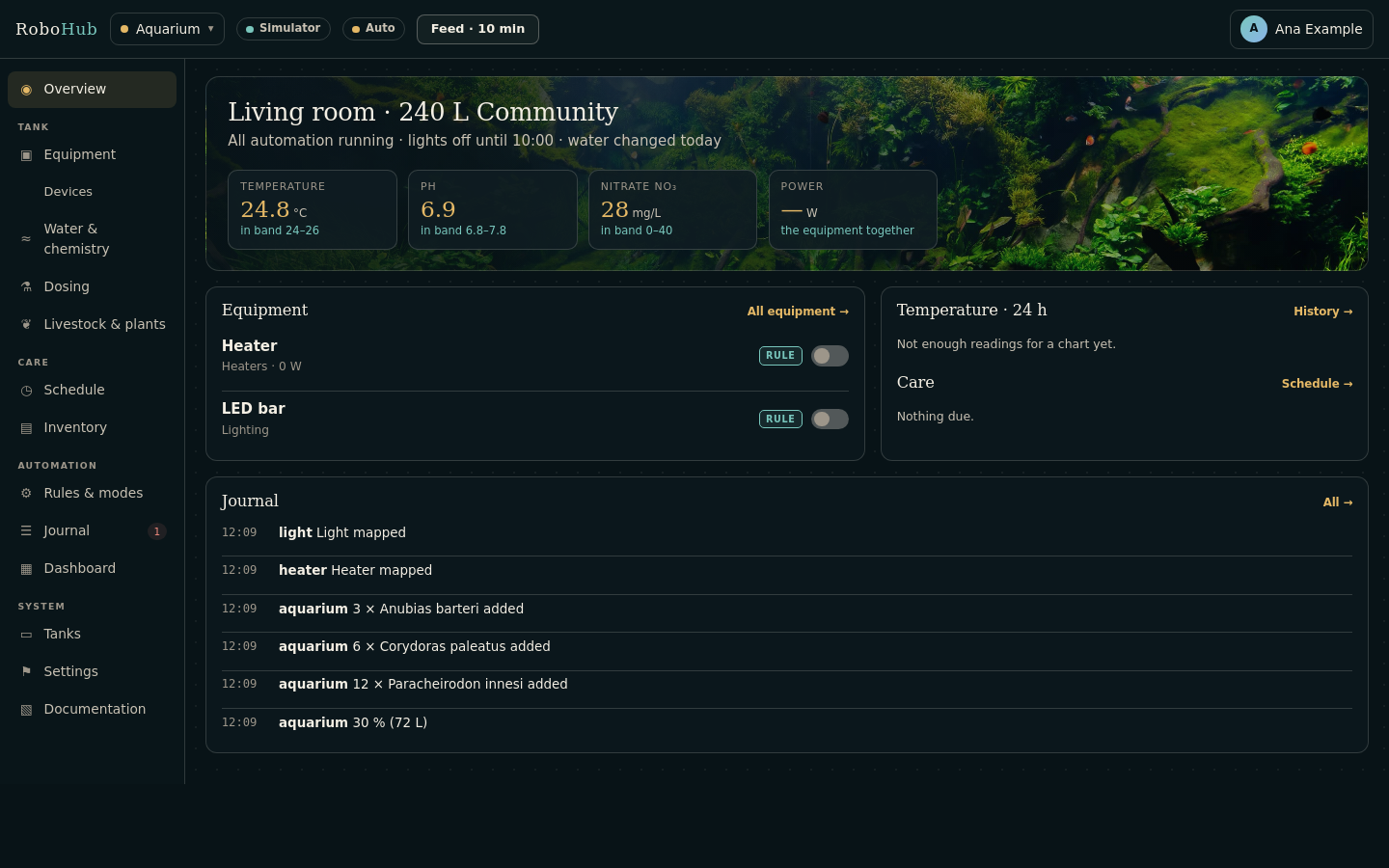
| Overview | / | The tank, its newest readings against their target bands, the equipment and its switches, the last day's temperature with the band behind it, what is due (chores and stock to reorder), the lights, the journal |
| Equipment | /equipment | Each piece of equipment, what it is bound to, what drives it (a rule or manual), its runtime and power, with its switch |
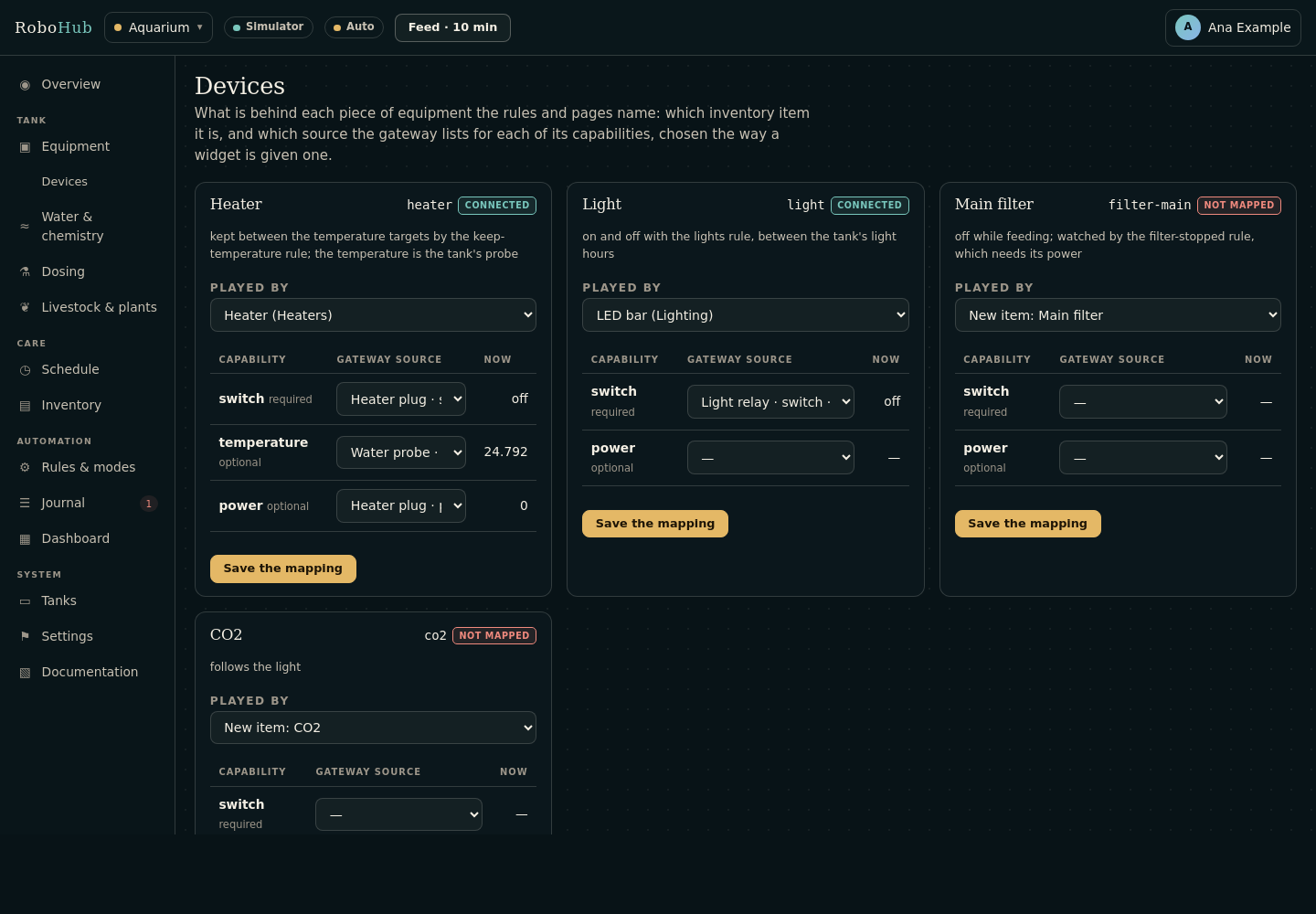
| Devices | /devices | The tank's roles — heater, light, main filter, CO₂ — and which item plays each, with each capability bound to a mesh source |
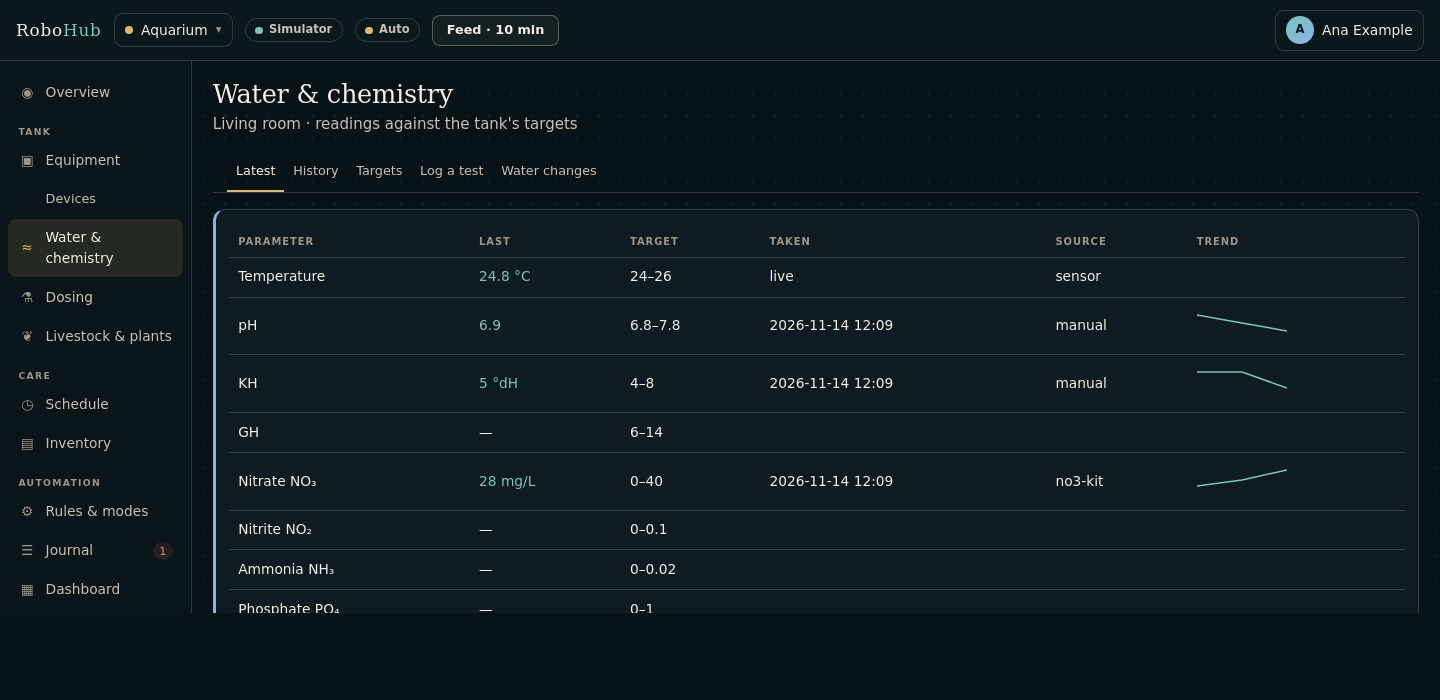
| Water & chemistry | /water | Tabs: Latest (each parameter's newest reading and trend), History, Log a test, Targets (the tank's bands), Water changes |
| Dosing | /dosing | What was added to the water, taken off the product's stock |
| Livestock & plants | /livestock | What lives in a tank — fish, invertebrates, corals, plants — how many, and losses |
| Schedule | /scheduler | Chores: water changes, tests, rinsing the filter by its runtime, cleaning the glass |
| Inventory | /expenses | Food, test kits, fertilisers, filter media and equipment, with their stock and purchases |
| Rules | /rules | The rules and modes, their state, editing a rule and putting a preset back |
| Journal | /journal | Everything that happened; open warnings are resolved here |
| Dashboard | /widgets | A dashboard of widgets over the tank's values |
| Tanks | /tank | Each tank's name, kind, volume and light hours, and the one shown by default |
| Settings | /settings | See below |
| Documentation | /docs | This guide, embedded in the program |
Older addresses — /chemistry, /automation, /modes, /events — lead to the pages
that replaced them.
Water tests and bands
A test is a reading of one parameter — temperature, pH, KH, GH, nitrate, nitrite,
ammonia, phosphate — by a kit (an inventory consumable a test uses up) or a sensor.
Log a test has a row per parameter, with the kit each used; rows left empty are
not tests. Against the tank's band a reading is in, low or high; out of band is a
journal warning — a notification, and an open entry until someone resolves it. A
water change logged is that tank's "Water change" chore done.
A tank's bands are seeded from its kind (planted, community, reef, pond) and changed
on the Targets tab; changing a tank's kind gives it that kind's bands.
Deleting a record
A water test, a water change or a dose entered by mistake is deleted from its row,
after a confirmation. Deleting a dose puts what it took back on the product's stock.
A loss is recorded against livestock rather than deleting it. Inventory items,
purchases, chores and widgets are deleted on their own pages.
Several tanks
Each tank has its own roles, rules and chores. The first tank — the one made first —
keeps the plain names: heater, keep-temperature, "Water change". Every other
tank's carry its handle: reef-nano-heater, reef-nano-keep-temperature,
"Water change · Reef nano". They are made from the presets when the tank is added,
kept current at every start, and follow its light hours when they change.
The pages show the tank chosen on the Tanks page; another is a click away
(?tank=<id> on any page — the Devices page shows the roles of the tank it is opened
for). The overview and the Water page read the temperature from that tank's heater.
The feeding and maintenance modes act on the first tank's equipment.
Equipment, roles and rules
The preset rules name equipment by role: heater, light, filter-main, co2. On
the Devices page give each role an item — any equipment, or a new one — and bind its
capabilities: the heater's switch to its plug and its temperature to a probe. Until
then the rules read nothing, do nothing, and say so on the Rules page.
| Role | Needs | Used by |
|---|---|---|
heater | switch, temperature (optional), power (optional) | keep-temperature, too-warm |
light | switch, power (optional) | lights, between the tank's light hours |
filter-main | switch, power (optional) | filter-stopped; off while feeding |
co2 | switch | co2-follows-light |
The temperature rules compare with the tank's own band: band.temperature.on and
.off are a quarter of the band in from each end — where the heater switches on and
off — and .alarm is two degrees past the top. Another tank's are
<handle>.band.temperature.on and so on. A rule may name any parameter's band
(band.no3.high) or a tank's newest result (no3 > 25).
| Mode | What it does |
|---|---|
| Feeding | Main filter off for ten minutes; filter-stopped suspended |
| Maintenance | Main filter and heater off until ended; the temperature and filter rules suspended |
Presets
What each shared module starts with is in presets/, embedded in the program:
| File | What it seeds |
|---|---|
targets.yml | the kinds of tank and their bands |
roles.yml | the roles and what each needs from the mesh |
rules.yml | the rules and the feeding and maintenance modes |
schedule.yml | water change, water test, filter rinse, glass cleaning |
inventory.yml | the inventory's categories and first items |
api.yml | the values offered to other applications |
sim.yml | the simulated devices |
Settings
| Tab | What it holds |
|---|---|
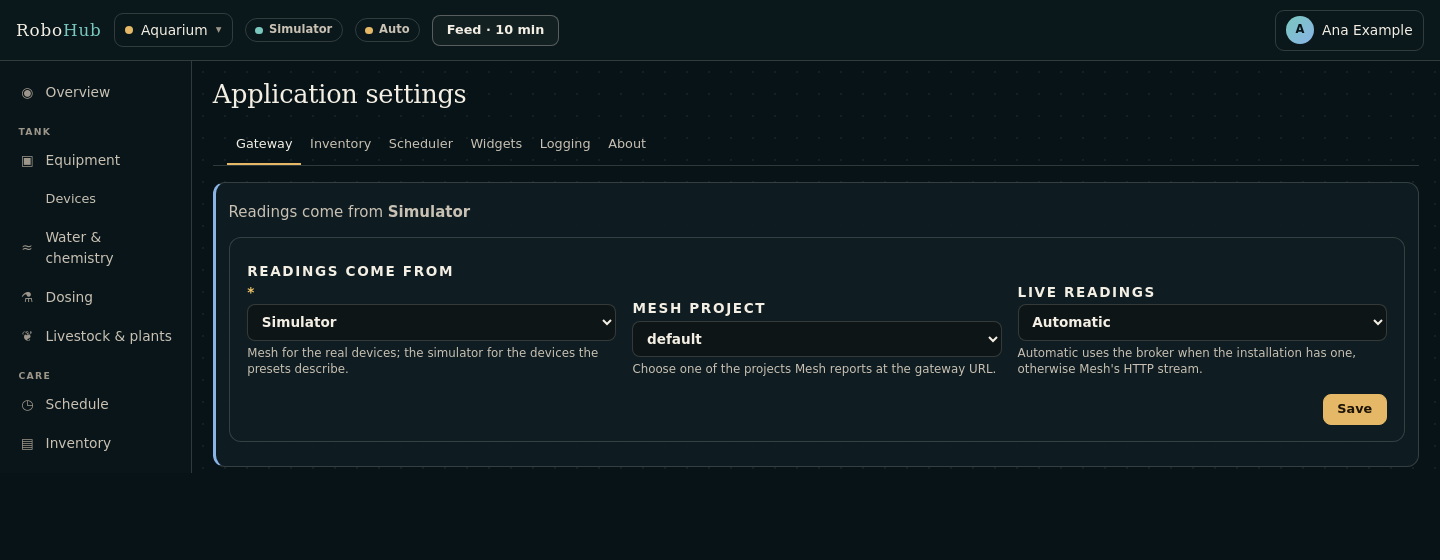
| Gateway | Where readings come from (Mesh or the simulator), Mesh's project, and how its changes arrive: automatically, over the broker or over HTTP. |
| Inventory | The inventory module's own settings. |
| Scheduler | The scheduler's own settings. |
| Widgets | The dashboard's own settings. |
| Logging | Level, text or JSON, rotating file, size, retention, standard error. |
| About | The gateway in use and the application's API. |
Mesh's address and the token it is read with come from the keeper; nothing is copied
into the aquarium. The gateway settings are the binding's, written to bind.conf in
the workspace.
How it connects to the rest
| What | How |
|---|---|
robohub.gateway | Bound to robohub-provider-mesh/index (Mesh at http://127.0.0.1:8478, project default, transport auto) and to the simulator, off by default. |
robohub.bus | Bound to robohub-provider-mqtt: subscribes to mesh/+/telemetry, the live feed Mesh relays. |
| Calls | deploy.calls: [mesh] — the keeper makes it a client of Mesh. |
| Shared modules | inventory/index (items and the equipment's automation, the Devices page), scheduler, rules, journal, widgets, appapi, simulator, appshell, ui, forms, notifications, settings, i18n, logging, htmx. |
| Host hooks | host_app, host_app_title, host_shell, host_settings_tabs/form/save, host_devices_* — how the shared modules draw inside the aquarium. |
API
Under the aquarium's sign-in; another application asks with a service token.
| Method and path | What it answers |
|---|---|
GET /api/v1/values | Every value the aquarium offers: each tank's newest results as <tank>.<parameter> (and <parameter> for the first tank), the water temperature, its 24-hour average, days since the last water change, the heater's energy this week |
GET /api/v1/values/{id} | One value |
GET /api/v1/values/{id}/history | Its history |
GET /api/v1/events | What happened, as events |
GET /api/journal | The journal |
GET /api/rules | The rules and their state |
GET/POST /api/scheduler/chores | The chores; add one |
POST /api/scheduler/chores/{id}/complete, /snooze, /usage | Complete, snooze or record usage of a chore |
GET /api/widgets, POST /api/widgets/{id}/value, /press | The dashboard's widgets |
GET /api/expenses/count | How many inventory items there are |
Operating notes
| What | Where |
|---|---|
| Workspace | ~/.rho/keeper/workspaces/aquarium under the keeper (ROBOHUB_APP_WORKSPACE) |
| Database | data/app.db in the workspace: tanks, tests, doses, livestock and the shared modules' records |
| Settings, bindings | data/settings.conf, bind.conf in the workspace |
Logs. The aquarium logs to standard error, kept by its unit's journal (the
keeper's Log, or journalctl --user -u aquarium); the Logging tab adds a
rotating file.
Backup. Copy the workspace with the aquarium stopped; data/app.db is everything
the aquarium knows, and bind.conf and data/settings.conf what it was told.
Tests. rho test . builds the aquarium and walks it over HTTP.
Release history
[0.1.0] - 2026-11-02
The aquarium application host. One HTTP service and one router; the inventory module serves /expenses, the scheduler serves /scheduler and /api/scheduler, and the widgets module serves the dashboard cards and /api/widgets. All keep their tables in the application's main SQL database and their records in its workspace.
[0.2.0] - 2026-11-02
The aquarium framework: equipment and devices, automation rules with a value evaluation and audit event, the water chemistry log, operational modes and the event trail. The home page is a dashboard built from configurable widgets: numbers, charts, buttons and switches, each with its own source or hook. All forms are semi-opaque panels over the aquarium background.
[0.2.1] - 2026-11-03
A Settings page for the Mesh and gateway URLs. The widget editor reads the device list through Mesh and the gateway and offers it as a Mesh device selection; a Switch widget can then turn a plug on and off from the dashboard.
[0.2.2] - 2026-11-03
Settings name a Mesh project, not just a Mesh URL. Aquarium asks Mesh for that project's gateway (/mesh/api/projects/{project}/gateway) and stores the address automatically; the widget editor then lists the devices behind that gateway.
[0.2.3] - 2026-11-03
The dashboard keeps its full menu everywhere, offers + Add widget beside the dashboard, and the switch cards are switch-first: no panel border, a larger switch, the title opens the widget settings, and pressing the switch stays on the dashboard.
[0.2.4] - 2026-11-03
The dashboard is reactive: widgets listen to the widgets SSE stream and refresh device states in the background, so an externally switched plug updates without a page reload. A dashboard switch press updates the control in place.
[0.2.5] - 2026-11-03
The dashboard's switch press no longer assumes a JSON reply: an older cached page that posts the form normally is followed by a reload instead of a JSON parse error. Dashboard pages are served with no-store so the live script is not cached.
[0.2.6] - 2026-11-03
The switch card shows one switch (its text is no longer drawn as a second track), and reconnecting the event stream starts from the current state rather than replaying old events.
[0.2.7] - 2026-11-03
Widget switches are correct on the first paint: the dashboard syncs the gateway state before rendering, and still updates live through SSE with an API polling fallback.
[0.2.8] - 2026-11-03
The widget editor lists the Mesh project's inputs and outputs, not only gateway devices: modules and sensors can feed numbers, charts and tables, and a plug can feed a switch or show its power. The list is filtered by the widget kind and the signal's direction, and a chosen source fills its unit. The dashboard has a Table widget with a settable row count.
[0.2.9] - 2026-11-04
Aquarium signs in through Keeper SSO. The dashboard, widgets and settings are behind the aquarium session; outbound Mesh API calls carry a signed service JWT so widgets keep reading and driving Mesh.
[0.3.0] - 2026-11-05
Aquarium's dashboard charts use the robohub-mesh telemetry store. A chart bound to a Mesh source reads the source's history through the mesh-gateway provider; a number reads the latest stored value. A project's temperature chart therefore shows a series instead of the local snapshots the widget happened to fetch. The Aquarium menu also carries the Keeper link when the keeper started the application, with the same ↑ affordance as Mesh.
[0.3.1] - 2026-11-06
Fixed chart widget to parse decimal values (was showing flat line). Chart now requests 2 hours of history instead of 24 hours for responsiveness. Service token now requires mesh:default scope.
[0.3.2] - 2026-11-08
English and Romanian pages, flag-based language switching, and translated navigation, settings, forms and live widget updates. The Aquarium settings page now owns the runtime settings for the application and its Inventory, Scheduler and Widgets dependencies, with vertical tabs, a shared URL/gateway tab, and a single module-tab layout preference.
[0.3.3] - 2026-11-09
Inventory, scheduler and widget pages now render inside the aquarium shell instead of their own layouts. Widget card CSS comes from the widgets module.
[0.3.4] - 2026-11-12
The smoke test signs in with a keeper ticket, as the keeper issues them.
[0.4.0] - 2026-11-12
Aquarium reaches Mesh through the gateway interface, binding the Mesh provider with Mesh's address and the project in module.yml. The Settings page writes those into the binding's settings for the installation; the mesh-gateway plugin entry, the contract include and gateway.conf are gone.
[0.4.1] - 2026-11-13
The aquarium has a repository of its own, robohub-aquarium, beside the orchestrator, with its history. It declares the RoboHub platform, and binds the bus as well as the gateway: with transport: auto the Mesh provider (0.4.0) follows the feed Mesh relays on the keeper's broker (mesh/<project>/telemetry, which its broker user may read) and falls back to Mesh's HTTP stream when there is no broker.
Its own db/schema.sql and db/queries.sql now hold the aquarium's tables only. The copies of the inventory, scheduler and widgets tables and statements are gone: those modules declare their own (inventory 0.2.0, scheduler 0.1.5, widgets 0.2.6) and rho-sql 0.2 generates them in.
[0.5.0] - 2026-11-13
The aquarium is rebuilt on the shared RoboHub modules, in the RoboHub shell.
What is an aquarium's is its own: tanks (volume, kind, light hours), each with target bands per parameter seeded from its kind (presets/targets.yml); water tests logged a row per parameter with the kit each used up, compared with the bands (out of band is a journal warning) and offered as values a rule can read (no3); water changes, which complete the water-change chore; doses, which take the product off the inventory; livestock and plants, with losses.
What any application needs is a shared module, seeded from the aquarium's presets: equipment is inventory items bound to gateway sources (inventory 0.2), automation is rules and modes (feeding, maintenance), events are the journal, recurring care is the scheduler, the dashboard is widgets 0.3, and /api/v1/values and /api/v1/events are appapi. Readings come from Mesh or the simulator, chosen in Settings, with Mesh's transport and project; the aquarium no longer registers with Mesh itself or keeps a shared-secret callback.
The pages: an overview (the tank, its readings against their bands, equipment with its switches, the last day's temperature, what is due, the journal), equipment, water and chemistry, dosing, livestock and plants, tanks and settings, with the shared modules' pages in the same shell; dark and light. The old equipment, automation, chemistry, modes and events pages lead to their new places. An installation of 0.4 keeps its records: its events move to the journal once, and its widgets' Mesh URLs move to stable ids.
[0.5.1] - 2026-11-13
same_origin refuses a form posted from another origin: keeper and the other applications are other ports of the same host, which a SameSite cookie does not tell apart. Built on widgets 0.3.1, inventory 0.2.1, i18n 0.4.1, rules 0.1.1 and notifications 0.1.4. The smoke test tries each of the holes those close.
[0.5.2] - 2026-11-13
The clock is read from the process (rho_now_s, rho 0.6.0) instead of from date written to a file and read back, which a request and the background loop could truncate under each other: entries dated 1970 and modes that expired at once. Built on the shared modules' fixes of the same kind and provider-mesh 0.5.1, which no longer hands one source's reading to another.
[0.5.3] - 2026-11-13
A form that changed something sends the browser back to its page by GET: reloading the page after logging a test, a dose, a water change, livestock, a tank or a device mapping no longer does it again — a second kit used up, the water-change chore completed twice. A water test with one value that is not a number keeps none of them, so sending it again corrected logs nothing twice.
[0.5.4] - 2026-11-13
Built on the shared modules' fixes: cron chores read as cron, rule durations with decimals and days, a mode ended once, the journal badge past 500, the newest history points, inventory totals in 64 bits and decimal commas, no blank notification.
[0.6.0] - 2026-11-13
Several tanks, each with its own equipment, rules and chores.
- Roles are a tank's: the first tank keeps
heater,light,filter-mainandco2; another tank's are its handle's (reef-nano-heater). The Devices page fills the roles of the tank it is opened for, and offers the others. - Each tank has its own copy of the preset rules, named and written with its handles and its light hours, made when it is added and kept current at start. - The temperature rules compare with the tank's own band rather than fixed numbers: the heater switches on a quarter of the band above its bottom and off a quarter below its top (band.temperature.on,.off), and the alarm is two degrees past the top (.alarm). For the planted band, 24.5–26 °C, that is on below 24.875 and off above 25.625, where it was 24.5 and 25.5. - Each tank has its own water change, water test and filter rinse; a water change logged for a tank completes that tank's. - The overview, the Water page and the temperature chart read the tank's own probe, through its heater; the light status is the tank's light. - The feeding and maintenance modes still act on the first tank's equipment.
[0.6.1] - 2026-11-13
Built on rules 0.1.4: a rule whose action fails says so once and tries again a minute later, even when the temperature hovers at its threshold.
[0.6.2] - 2026-11-14
The settings page, the docs page and the shell's top bar are the shared appshell module's (robohub/modules/appshell 0.1.0); the aquarium keeps its rail, its feeding button and its layout, and answers hostapp() and hostapp_title(). Its own copy of the settings page and the strings only it used are gone.
[0.6.3] - 2026-11-14
Its own trimming, number reading and decimal and URL writing are gone: the toolchain's str_trim, milli_* and str_url_encode (rho 0.7.0) do it, the same way every RoboHub module now does. A number is still read with a dot or a comma. Needs rho 0.7.0.
[0.6.4] - 2026-11-14
The Devices page is the inventory's (inventory 0.3.0): the aquarium says which roles a tank has and which tank the page is about, and the page — the same one energy has — does the rest. A role is still filled by any equipment or a new item, and the second tank's roles still carry its handle.
[0.6.5] - 2026-11-14
Reading an item's capability or a published value — what every rule does every few seconds — is a lookup, not a list of every item (inventory 0.3.1, appapi 0.1.4).
[0.6.6] - 2026-11-14
Rules can be edited on the Rules page, a preset rule put back as its preset (rules 0.1.8).
[0.6.7] - 2026-11-14
The page an equipment switch returns to is checked by i18n_safe_next: a path on this application and nothing else.
[0.6.8] - 2026-11-14
Uses the toolchain's i64_to_str and str_field instead of its own copies, and the modules' single rule for where data lives (rho 0.8.0).
[0.6.9] - 2026-11-14
A water test, a water change or a dose entered by mistake can be deleted from its row, after a confirmation; deleting a dose puts what it took back on the product's stock.
[0.6.10] - 2026-11-14
Its settings page lists the inventory, scheduler and widgets tabs itself (host_settings_*), each module's own form.
[0.6.11] - 2026-11-14
A tank with no light hours says "lights on" or "lights off" on its overview instead of "lights off until" with nothing after it.